Back to Projects
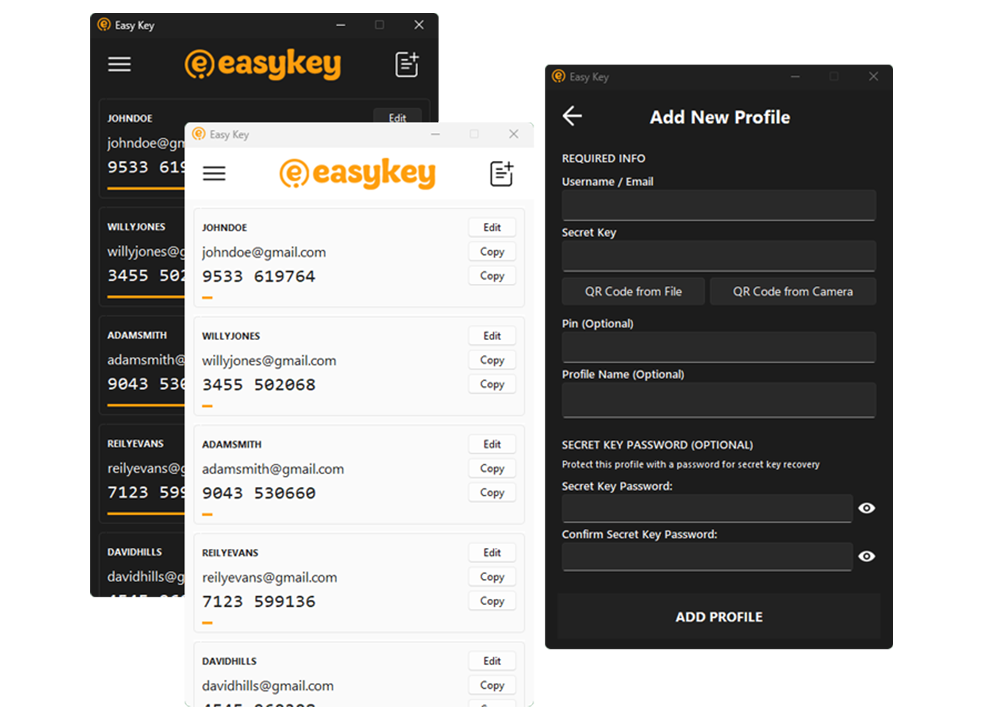
Easy Key Authenticator
In-progress
View Source
A secure desktop TOTP authenticator for Windows with encrypted storage, QR code support, and system tray integration.
Technologies Used
Python
Tkinter
Cryptography
OpenCV
TOTP
About This Project
Easy Key is a modern TOTP (Time-based One-Time Password) authenticator application for Windows. Features include Fernet encryption with PBKDF2 key derivation, QR code scanning from files or camera, system tray support, auto-start capability, and password-protected profile exports. Built with Python, Tkinter, and follows RFC 6238 for TOTP implementation.
Key Features
Security & Privacy
- • Fernet encryption with PBKDF2 (SHA256, 200k iterations)
- • Per-profile secret key passwords
- • Password-protected exports (.easykey format)
- • Local-only storage - no cloud sync
- • Profile view lock with auto-lock timer
QR Code Support
- • Import from QR code images (PNG, JPG, etc.)
- • Real-time camera scanning with live preview
- • Supports otpauth:// URLs and base32 secrets
- • Dual decoder (OpenCV + pyzbar fallback)
TOTP Management
- • Add, edit, and delete authentication profiles
- • One-click copy to clipboard
- • Auto-refresh every 30 seconds
- • Visual countdown indicator
- • Optional PIN support
System Integration
- • System tray support with quick restore
- • Auto-start on Windows boot (optional)
- • Hide on load to system tray
- • Modern Light/Dark/Auto themes
- • Configurable window position
Technical Architecture
Framework: Tkinter with ttk widgets
Theme Engine: sv_ttk (Light/Dark/Auto)
Encryption: Cryptography library (Fernet)
TOTP: RFC 6238 compliant implementation
System Tray: pystray for background operation
QR Decoding: OpenCV with pyzbar fallback
Security Note
Authenticators are ideally stored on a separate device for maximum security. If you choose to use Easy Key on the same device you log in with, please be aware of the added risk. Easy Key compensates with strong encryption, secure profiles, and protected exports to ensure that—even if your device is lost—you can still recover your authentication codes safely. The Profiles View is unlocked by default, but you can enable password protection in the Settings for enhanced security.